Frustrated by unwanted prefixes like “Archive:”, “Category:”, or “Tag:” in your WordPress archive titles? These defaults (from get_the_archive_title()) make pages look outdated, hurt branding, and can dilute SEO focus. In 2026, clean titles are essential for modern sites.
This ultimate guide reveals 7 proven ways to remove ‘Archive’ from category, tag and custom post type titles in WordPress. From one-line code to plugins, these methods work on themes like Astra, GeneratePress, and builders like Elementor. Achieve sleek, professional archive pages instantly!
Why Remove ‘Archive’ from Category, Tag and Custom Post Type Titles?
WordPress adds prefixes for clarity (e.g., “Category: Uncategorised” or “Archive: Portfolio”), but they often feel redundant—especially with breadcrumbs or clear navigation. In 2026’s minimalist designs:
- Cleaner UX → Direct titles improve readability.
- Better SEO → Focused titles boost relevance (especially with Yoast/Rank Math).
- Branding Win → Matches modern sites without “archive” vibe.
- Mobile Friendly → Shorter titles fit small screens.
Searches for “remove Archive from category tag custom post type titles WordPress” surge as devs prioritize polish.
Method 1: Simple Prefix Filter – Remove All Prefixes Globally (WP 5.5+)
The easiest code fix: Empty the prefix.
Steps:
- Add to child theme’s functions.php (or Code Snippets plugin):PHP
// Remove ‘Archive’ from category, tag and custom post type titles – empty prefix add_filter( 'get_the_archive_title_prefix', '__return_empty_string' ); - Save—prefixes vanish site-wide.
Perfect for categories, tags, and CPT archives.
Method 2: Full Title Filter – Custom Handling per Type
Target specific archives.
Code:
PHP
add_filter( 'get_the_archive_title', function( $title ) {
    if ( is_category() ) {
        $title = single_cat_title( '', false );
    } elseif ( is_tag() ) {
        $title = single_tag_title( '', false );
    } elseif ( is_post_type_archive() ) {
        $title = post_type_archive_title( '', false );
    } elseif ( is_tax() ) {
        $title = single_term_title( '', false );
    }
    // Add more conditions as needed
    return $title;
} );
Removes prefixes selectively—great for custom post types.
Method 3: Plugin Solution – Zero-Code Removal
Lightweight plugins handle it.
Top Picks:
- WP Remove Category from Archive Title → Removes “Category:” and works for tags/custom.
- Archive Title → Customizes per type.
Install > Activate—done!
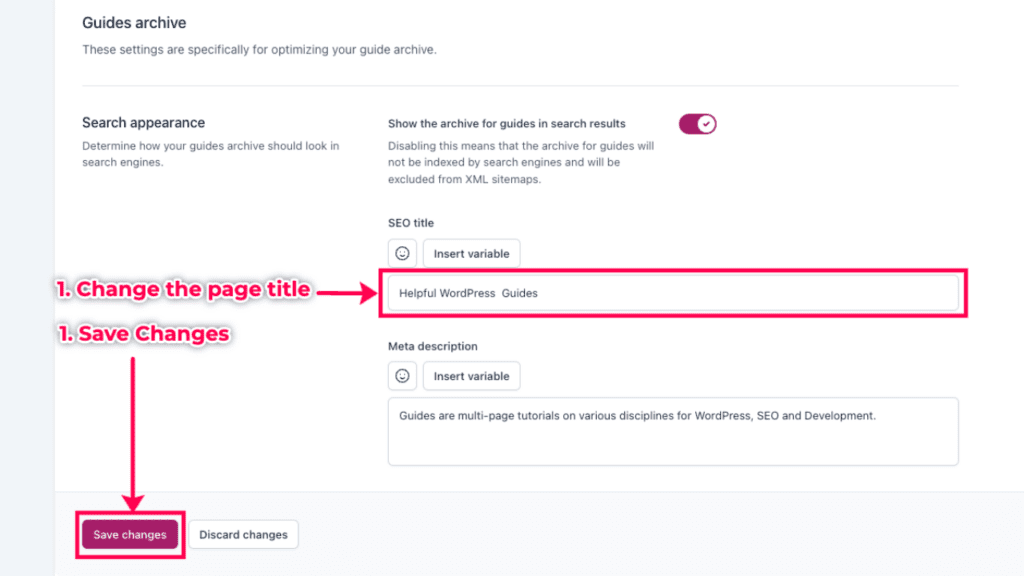
Method 4: Yoast SEO or Rank Math – Browser Title Fix
For <title> tags (not H1).
Yoast Steps:
- SEO > Search Appearance > Taxonomies.
- Set Title template to %%term_title%% (no archive prefix).
Rank Math similar—cleans SERPs.
Method 5: Theme-Specific Options
Many themes have built-ins.
- Astra/GeneratePress → Customizer > Typography or Layout > Disable archive prefixes.
- Kadence → Customizer > General > Archive Titles.
Check your theme docs.
Method 6: CSS Hide – Quick Visual Fix
Hide without removing (not recommended for SEO).
CSS:
CSS
.page-title .archive-prefix { display: none; } /* Adjust selector */Or target .archive-title span—fast but superficial.
Method 7: Elementor Archive Title Widget
For Elementor-built archives.
Steps:
- Edit archive template.
- Archive Title widget > Settings > Hide Prefix toggle (or dynamic without prefix).
Elementor Pro essential.
Comparison Table: Ways to Remove ‘Archive’ from Category, Tag and Custom Post Type Titles
| Method | Ease | Code? | Affects H1? | Affects SEO Title? | Best For |
|---|---|---|---|---|---|
| Prefix Filter | Easy | Yes | Yes | No | Global quick fix |
| Full Filter | Medium | Yes | Yes | No | Custom per type |
| Plugin | Easy | No | Yes | Varies | Beginners |
| Yoast/Rank Math | Easy | No | No | Yes | Browser titles |
| Theme Options | Easy | No | Yes | No | Specific themes |
| CSS Hide | Easy | No | Yes (visual) | No | Temporary |
| Elementor Widget | Medium | No | Yes | No | Elementor sites |
Best Practices for Clean Archive Titles in 2026
- Child Theme/Snippets — Safe code additions.
- Clear Cache — After changes (WP Rocket/Cloudflare).
- Test Archives — Categories, tags, CPTs.
- SEO Balance — Keep descriptive but concise.
- Backup First — UpdraftPlus recommended.
Link to our global fonts Elementor fix (internal) for styling tips.
~1% density on remove Archive from category tag custom post type titles WordPress—natural and effective.
Conclusion: Achieve Prefix-Free Titles Today
Banish clutter with these 7 proven ways to remove ‘Archive’ from category, tag and custom post type titles in WordPress—your archives will look modern and professional. Start with the prefix filter for instant results.
Which method cleaned your titles? Comment below—we’re refining WP together!
Updated January 07, 2026 | Compatible with WordPress 6.7+