The WordPress Writing Settings allow you to customize your post creation and content editing experience for posts, pages, and custom post types, while also managing remote publishing and update notifications.
How to Access
Navigate to your WordPress dashboard.
Go to Settings > Writing.
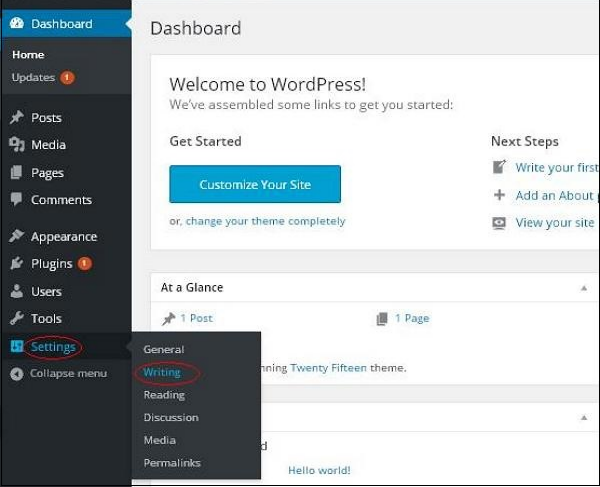
Key Setting Fields & Options
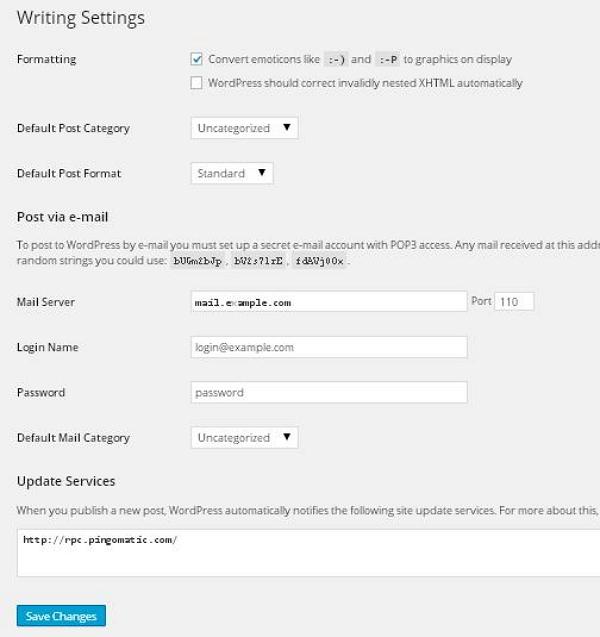
- Formatting Options
- Emoticons: Automatically converts text-based smileys (like
:-)) into graphic images when displayed. - XHTML Correction: Automatically fixes improperly nested XHTML tags within your posts and pages.
- Emoticons: Automatically converts text-based smileys (like
- Default Post Category: Selects the default category assigned to new posts (typically left as “Uncategorized” until changed).
- Default Post Format: Determines the default structural style themes use to display different types of posts.
- Post via e-mail: Enables you to publish content directly to your blog by sending an email.
- Mail Server: The POP3-compatible mail server address (e.g.,
mail.example.com) used to retrieve emails. - Login Name & Password: The secure credentials for the dedicated email account WordPress checks for posts. (Keep this confidential to prevent spammer exploitation).
- Default Mail Category: The custom category automatically assigned to all posts published via email.
- Mail Server: The POP3-compatible mail server address (e.g.,
- Update Services: A field where WordPress automatically notifies external ping/update services whenever a new post is published.
Once you have configured your preferred settings, click the Save Changes button at the bottom of the page.