How to access it
The General Settings screen lets you configure the basic options for your WordPress site. It’s the default settings page in the admin area.
Go to Settings → General in the WordPress dashboard.
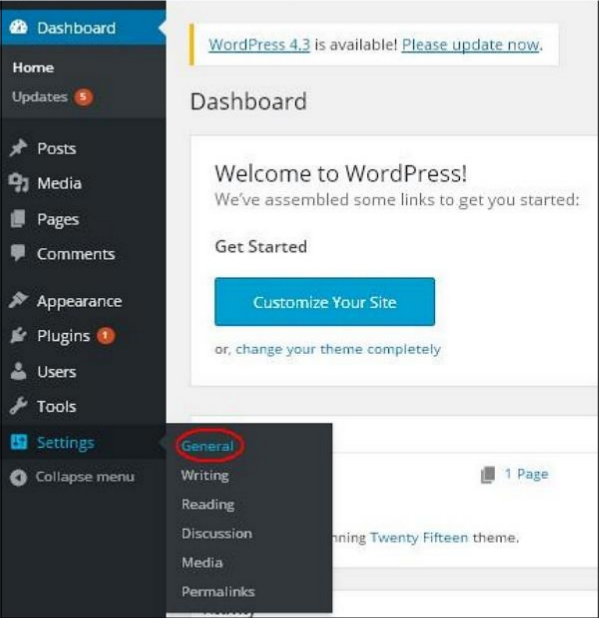
Available fields
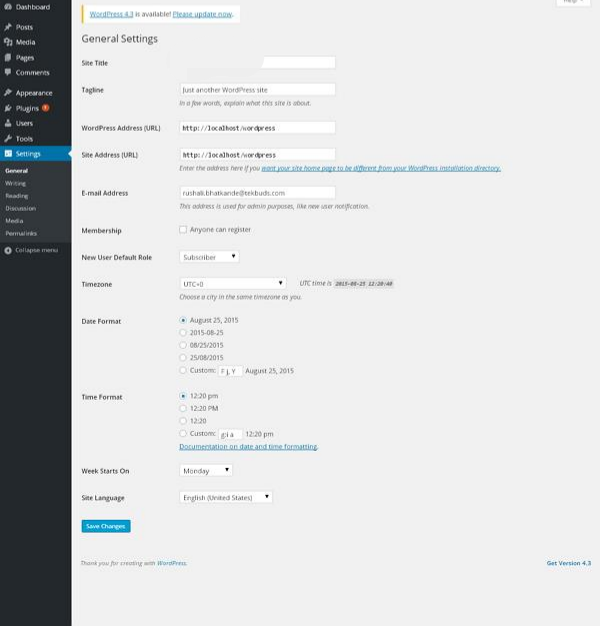
- Site Title — The name of your site (shown in the header of most themes).
- Tagline — A short description or slogan for your site.
- WordPress Address (URL) — The URL of the folder that contains your WordPress core files.
- Site Address (URL) — The public URL visitors use to reach your site.
- Email Address — The admin email used for password recovery and important notifications.
- Membership — Check this box if you want anyone to be able to register an account.
- New User Default Role — The role automatically assigned to newly registered users.
- Timezone — Choose the timezone that matches your location (or preferred city).
- Date Format — How dates should appear on the site.
- Time Format — How times should appear on the site.
- Week Starts On — The day the calendar week begins (default is Monday).
- Site Language — The language used in the WordPress admin dashboard.
After making your changes, click Save Changes to apply them.
#WordPress #WordPressForBeginners #WordPressTutorial #WebDevelopment #LearnWordPress