Remove query strings from static resources is one of the easiest yet most effective WordPress speed optimizations. Those pesky “?ver=” or similar parameters appended to CSS and JavaScript files (e.g., style.css?ver=6.4) can prevent proper caching by some CDNs, proxy servers, and browsers. Removing them often improves your GTmetrix, Pingdom, or Google PageSpeed scores without breaking your site.
In this comprehensive guide, we’ll cover why this matters and how to remove query strings from static resources using both plugin and no-plugin methods. Whether you’re a beginner or advanced user, you’ll find a solution that fits.
Table of Contents
- What Are Query Strings in WordPress Static Resources?
- Why Remove Query Strings from Static Resources?
- Method 1: Use a Lightweight Plugin (Easiest)
- Method 2: Add Simple Code to functions.php (No Plugin)
- Method 3: Advanced Code for Better Compatibility
- Method 4: Popular Performance Plugins with Built-in Option
- Method 5: Check Hosting/CDN Settings
- Potential Risks and How to Avoid Breaking Your Site
- Verify the Changes and Test Performance
- Conclusion
What Are Query Strings in WordPress Static Resources?
Static resources refer to files like CSS stylesheets and JavaScript scripts that don’t change often. WordPress automatically adds version query strings (e.g., ?ver=6.5.3) to these URLs to bust browser caches when you update plugins or themes.
Example:
While useful for development, these can hinder long-term caching on production sites.
Why Remove Query Strings from Static Resources?
- Improves browser/CDN caching efficiency
- Eliminates “Remove query strings from static resources” warnings in speed tools
- Slightly reduces page load time (especially with older proxies)
- No negative impact on functionality if done correctly
Modern best practices (post-2014 Google updates) downplay this, but many site owners still optimize for it to max out scores.
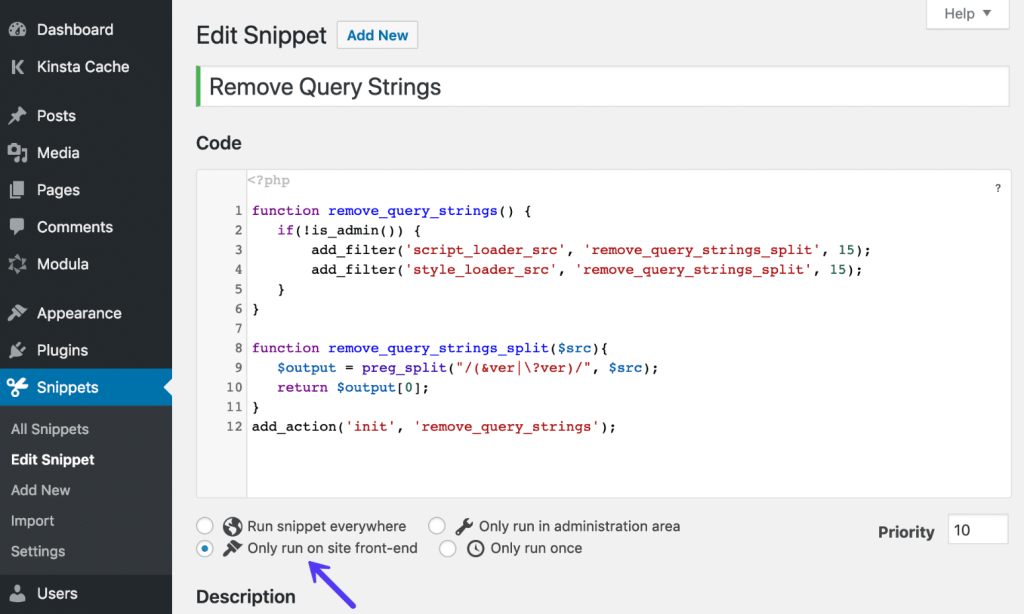
Method 1: Use a Lightweight Plugin (Easiest)
For quick results without code, install a dedicated or multi-purpose plugin.
Popular free options:
- Remove Query Strings from Static Resources (simple, lightweight)
- WP Performance Score Booster (includes this + GZIP + more)
- Speed Optimizer by SiteGround (if hosted there)
Steps:
- Go to Plugins > Add New in your WordPress dashboard.
- Search for “remove query strings” or “performance score booster”.
- Install and activate.
- Most auto-apply the fix—no extra settings needed.
- Clear your cache (site + browser).
This is ideal if you avoid editing theme files.
Method 2: Add Simple Code to functions.php (No Plugin)
Prefer zero extra plugins? Use this classic snippet. Always use a child theme to avoid losing changes on updates.
- Backup your site first.
- Go to Appearance > Theme File Editor (or use FTP).
- Open your child theme’s functions.php.
- Paste at the end:
PHP
function remove_cssjs_ver( $src ) {
    if ( strpos( $src, '?ver=' ) ) {
        $src = remove_query_arg( 'ver', $src );
    }
    return $src;
}
add_filter( 'style_loader_src', 'remove_cssjs_ver', 10, 2 );
add_filter( 'script_loader_src', 'remove_cssjs_ver', 10, 2 );- Save and clear cache.
This removes “?ver=” parameters from enqueued styles and scripts.
(Alt text: Screenshot showing CSS file URL before and after removing query strings from static resources)
Method 3: Advanced Code for Better Compatibility
Some plugins/themes add custom query strings (e.g., Jetpack ?w=). Use this enhanced version:
PHP
function advanced_remove_query_strings( $src ) {
    $src = remove_query_arg( 'ver', $src );
    // Add more if needed, e.g., for specific plugins
    $src = remove_query_arg( array( 'w', 'ver', 'v' ), $src );
    return $src;
}
add_filter( 'script_loader_src', 'advanced_remove_query_strings', 15, 1 );
add_filter( 'style_loader_src', 'advanced_remove_query_strings', 15, 1 );
Or the explode method (simpler fallback):
PHP
function _remove_script_version( $src ){
    $parts = explode( '?', $src );
    return $parts[0];
}
add_filter( 'script_loader_src', '_remove_script_version', 15, 1 );
add_filter( 'style_loader_src', '_remove_script_version', 15, 1 );
Test thoroughly—exclude admin if issues arise.
Method 4: Popular Performance Plugins with Built-in Option
Many all-in-one tools include this toggle:
- Perfmatters → Options > General > Remove Query Strings
- WP Rocket (premium) → File Optimization tab
- Autoptimize → Check “Remove query strings” (minor impact noted)
- LiteSpeed Cache or FlyingPress often have it under optimization settings
These plugins combine it with minification, concatenation, and lazy loading for bigger gains.
Method 5: Check Hosting/CDN Settings
Some hosts/CDNs handle this automatically:
- Cloudflare: Use Page Rules or Polish settings
- SiteGround Optimizer: Disable conflicting options if issues
- Kinsta: Often optimized out-of-box
Review your provider’s dashboard for “remove query strings” or caching tweaks.
Potential Risks and How to Avoid Breaking Your Site
- Version busting: Updates may not reflect immediately (clear cache often)
- Plugin conflicts: Test after changes
- CDN issues: Purge cache after implementation
- Always use child theme or Code Snippets plugin for safe code addition
If something breaks, revert the code/snippet and clear caches.
Verify the Changes and Test Performance
- Open your site in incognito mode.
- Right-click > Inspect > Network tab.
- Reload and check CSS/JS URLs—no “?ver=” should appear.
- Run GTmetrix/PageSpeed Insights before/after.
You should see the warning gone and slight score improvements.
Conclusion
Remove query strings from static resources is a quick win for WordPress performance. Start with a plugin for simplicity, or use the code method for a leaner site. Combine with other optimizations like image compression, caching, and minification for the best results.
Have you tried this tweak? Share your PageSpeed score improvement in the comments!
External reference links: